




When an existing application starts causing problems, the conversation often jumps straight to one solution:
“We should rebuild it.”
Sometimes that's correct.
Often it isn't.
Existing software can be difficult, slow, outdated or poorly documented without being beyond repair.
Before deciding what to do, we prefer to answer a simpler question:
What is actually wrong with it?
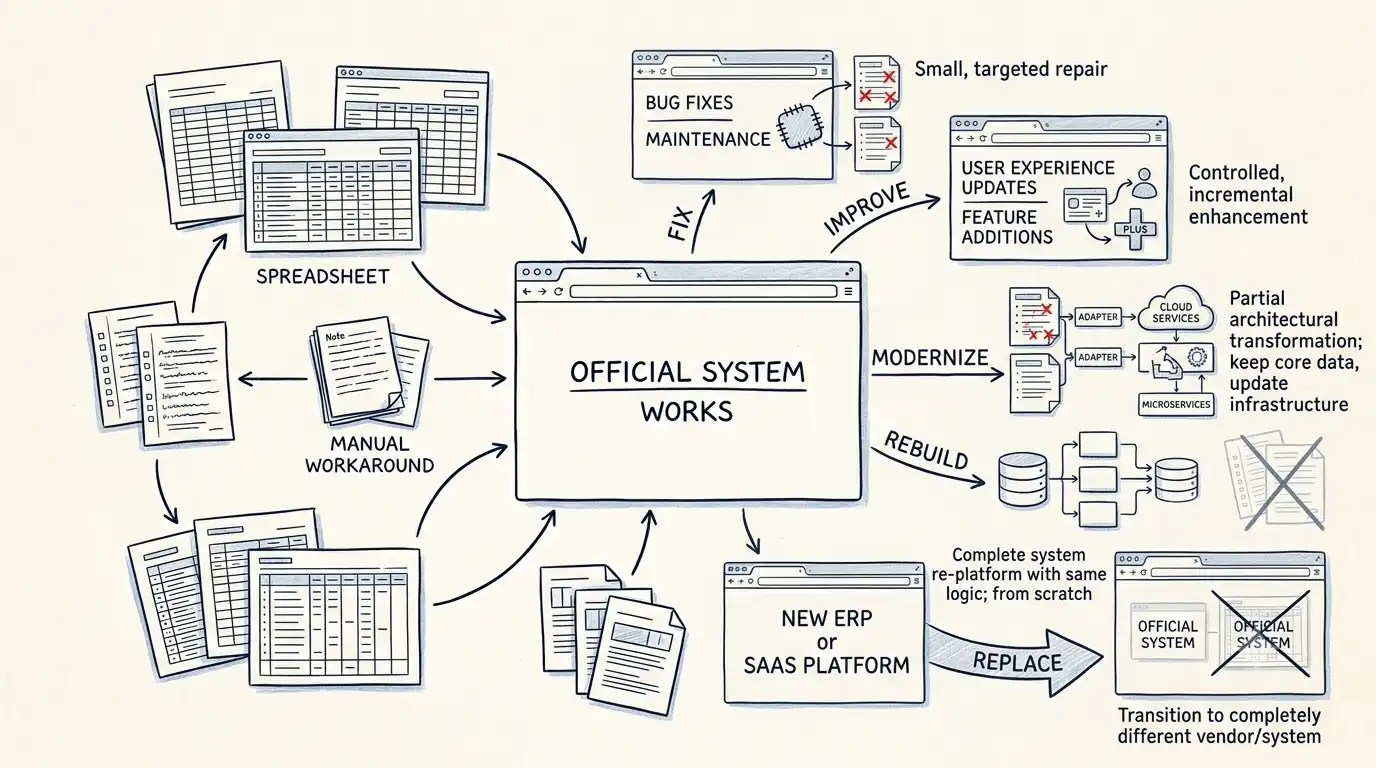
Only then can you decide whether to fix it, improve it, modernize it, rebuild it or replace it.
Fix It
Sometimes the problem is exactly what it looks like.
A feature is broken.
A particular process fails.
A report is producing incorrect information.
An integration stopped working.
If the underlying system is still understandable and the problem is contained, fixing it may be the right answer.
There is no prize for turning a small problem into a six-month project.
Improve It
A system can work correctly and still need improvement.
Maybe users need too many steps to complete a common task.
Maybe reporting is poor.
Maybe employees are constantly exporting information into Excel.
Maybe an approval process requires unnecessary manual work.
In these situations, the core system may still be valuable.
The sensible approach is to improve the parts that are causing friction.
Modernize It
Modernization becomes relevant when the technology itself starts limiting the business.
Perhaps the application is difficult to deploy.
Perhaps the development environment is no longer supported.
Perhaps security updates are becoming difficult.
Perhaps nobody can confidently change one part without worrying about breaking another.
Modernization doesn't necessarily mean rebuilding everything.
It can mean gradually replacing risky components while keeping the business running.
Rebuild It
A rebuild makes sense when the business logic is still valuable but the existing implementation has become a serious constraint.
For example, the company may depend heavily on a custom application, but the code may be so difficult to understand that every change is expensive and risky.
A rebuild can preserve what the business has learned while giving the system a healthier foundation.
But this is where teams often make a mistake.
They rebuild the old system exactly as it was.
That simply creates a newer version of the same problems.
Replace It
Sometimes the honest answer is that the existing software shouldn't exist anymore.
A commercial product may now solve the problem better.
A SaaS platform may remove years of maintenance.
The business process itself may have changed.
Or the custom application may no longer provide enough value to justify owning it.
Replacing software isn't failure.
Sometimes it's the best engineering decision.
The Decision Isn't Really About Technology
The decision should come from a combination of business value, risk, cost and technical reality.
We usually want to understand:
What does the system actually do?
Who depends on it?
Which parts are critical?
What is difficult to change?
What would happen if it stopped working?
How much does maintaining it really cost?
What would replacing it change?
What knowledge would be lost during a rebuild?
Only after answering those questions should someone recommend a direction.
The right answer might be fix.
It might be improve.
It might be modernize, rebuild or replace.
The important part is not choosing the most impressive option.
It's choosing the option that solves the actual problem with the least unnecessary risk.